
网站迁移至WordPress后,我还是觉得用OpenLiteSpeed去反代我的网站更好,虽然我目前使用的服务比较稳定和安全,速度也很快,但是架不住OpenLiteSpeed的巨大魅力。经过一段时间的折腾顺利配置好,效果还不错。
OpenLiteSpeed

测试情况
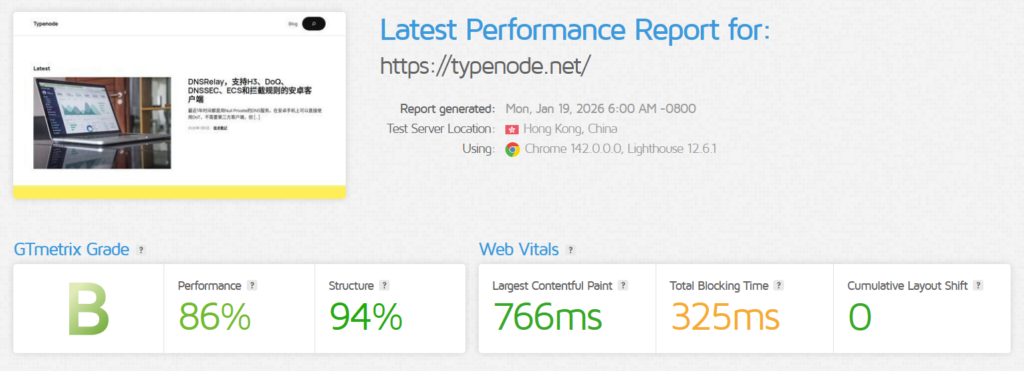
网站是WordPress6.9版本,加上2025主题,这个主题的性能非常强,强烈推荐使用。
未使用OpenLiteSpeed:
OpenLiteSpeed+LiteSpeed Cache:
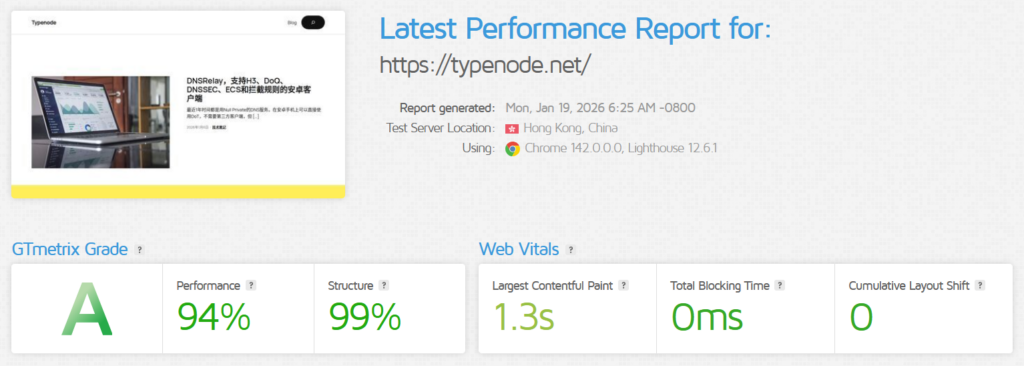
效果真的不错。
配置相关服务
配置看情况,但是核心参数就那几条。
参考资料:
Reverse Proxy | Configuration | OpenLiteSpeed Documentation | OpenLiteSpeed Documentation
Configuring OpenLiteSpeed as a Reverse Proxy

LSCache | Reverse Proxy | Configuration | OpenLiteSpeed Documentation | OpenLiteSpeed Documentation
Using LiteSpeed Cache with Apache using OpenLiteSpeed as Reverse Proxy
如何仅配置一个web服务,那么就比较简单。官方文档其实配置相对灵活,经过后台的配置后会生成一个配置文件,直接修改反代的网站就可以,非常方便。
OpenLiteSpeed服务配置
1.服务端开启缓存
#文件地址
/usr/local/lsws/conf/httpd_config.conf
#
# PLAIN TEXT CONFIGURATION FILE
#
# If not set, will use host name as serverName
serverName
user nobody
group nogroup
priority 0
inMemBufSize 60M
swappingDir /tmp/lshttpd/swap
autoFix503 1
gracefulRestartTimeout 300
mime conf/mime.properties
showVersionNumber 0
adminEmails root@localhost
errorlog logs/error.log {
logLevel DEBUG
debugLevel 0
rollingSize 10M
enableStderrLog 1
}
accesslog logs/access.log {
rollingSize 10M
keepDays 30
compressArchive 0
}
indexFiles index.html, index.php
expires {
enableExpires 1
expiresByType image/*=A604800,text/css=A604800,application/x-javascript=A604800,application/javascript=A604800,font/*=A604800,application/x-font-ttf=A604800
}
tuning {
maxConnections 10000
maxSSLConnections 10000
connTimeout 300
maxKeepAliveReq 10000
keepAliveTimeout 5
sndBufSize 0
rcvBufSize 0
maxReqURLLen 32768
maxReqHeaderSize 65536
maxReqBodySize 2047M
maxDynRespHeaderSize 32768
maxDynRespSize 2047M
maxCachedFileSize 4096
totalInMemCacheSize 20M
maxMMapFileSize 256K
totalMMapCacheSize 40M
useSendfile 1
fileETag 28
enableGzipCompress 1
compressibleTypes default
enableDynGzipCompress 1
gzipCompressLevel 6
gzipAutoUpdateStatic 1
gzipStaticCompressLevel 6
brStaticCompressLevel 6
gzipMaxFileSize 10M
gzipMinFileSize 300
quicEnable 1
quicShmDir /dev/shm
}
fileAccessControl {
followSymbolLink 1
checkSymbolLink 0
requiredPermissionMask 000
restrictedPermissionMask 000
}
perClientConnLimit {
staticReqPerSec 0
dynReqPerSec 0
outBandwidth 0
inBandwidth 0
softLimit 10000
hardLimit 10000
gracePeriod 15
banPeriod 300
}
CGIRLimit {
maxCGIInstances 20
minUID 11
minGID 10
priority 0
CPUSoftLimit 10
CPUHardLimit 50
memSoftLimit 2047M
memHardLimit 2047M
procSoftLimit 400
procHardLimit 450
}
accessDenyDir {
dir /
dir /etc/*
dir /dev/*
dir conf/*
dir admin/conf/*
}
accessControl {
allow ALL
}
extprocessor lsphp {
type lsapi
address uds://tmp/lshttpd/lsphp.sock
maxConns 10
env PHP_LSAPI_CHILDREN=10
env LSAPI_AVOID_FORK=200M
initTimeout 60
retryTimeout 0
persistConn 1
respBuffer 0
autoStart 1
path fcgi-bin/lsphp
backlog 100
instances 1
priority 0
memSoftLimit 0
memHardLimit 0
procSoftLimit 1400
procHardLimit 1500
}
scripthandler {
add lsapi:lsphp php
}
railsDefaults {
maxConns 1
env LSAPI_MAX_IDLE=60
initTimeout 60
retryTimeout 0
pcKeepAliveTimeout 60
respBuffer 0
backlog 50
runOnStartUp 3
extMaxIdleTime 300
priority 3
memSoftLimit 0
memHardLimit 0
procSoftLimit 500
procHardLimit 600
}
wsgiDefaults {
maxConns 5
env LSAPI_MAX_IDLE=60
initTimeout 60
retryTimeout 0
pcKeepAliveTimeout 60
respBuffer 0
backlog 50
runOnStartUp 3
extMaxIdleTime 300
priority 3
memSoftLimit 0
memHardLimit 0
procSoftLimit 500
procHardLimit 600
}
nodeDefaults {
maxConns 5
env LSAPI_MAX_IDLE=60
initTimeout 60
retryTimeout 0
pcKeepAliveTimeout 60
respBuffer 0
backlog 50
runOnStartUp 3
extMaxIdleTime 300
priority 3
memSoftLimit 0
memHardLimit 0
procSoftLimit 500
procHardLimit 600
}
module cache {
internal 1
checkPrivateCache 1
checkPublicCache 1
maxCacheObjSize 10000000
maxStaleAge 200
qsCache 1
reqCookieCache 1
respCookieCache 1
ignoreReqCacheCtrl 1
ignoreRespCacheCtrl 0
enableCache 1
expireInSeconds 3600
enablePrivateCache 1
privateExpireInSeconds 3600
ls_enabled 1
}
virtualhost Example {
vhRoot Example/
configFile conf/vhosts/Example/vhconf.conf
allowSymbolLink 1
enableScript 1
restrained 1
setUIDMode 0
}
listener Default {
address *:8088
secure 0
map Example *
}
listener HTTP {
address *:80
secure 0
map Example *
}
listener HTTPS {
address *:443
secure 1
keyFile /usr/local/lsws/admin/conf/webadmin.key
certFile /usr/local/lsws/admin/conf/webadmin.crt
}
vhTemplate centralConfigLog {
templateFile conf/templates/ccl.conf
listeners Default
}
vhTemplate EasyRailsWithSuEXEC {
templateFile conf/templates/rails.conf
listeners Default
}
vhTemplate docker {
templateFile conf/templates/docker.conf
listeners HTTP, HTTPS
note docker
member localhost {
vhDomain localhost, *
}
}2.修改vhost文件,直接在配置文件修改你需要反代的网站地址即可
#文件地址
/usr/local/lsws/conf/vhosts/Example/vhconf.conf
docRoot $VH_ROOT/html/
enableGzip 1
errorlog $VH_ROOT/logs/error.log {
useServer 1
logLevel DEBUG
rollingSize 10M
}
accesslog $VH_ROOT/logs/access.log {
useServer 0
rollingSize 10M
keepDays 30
compressArchive 0
}
index {
useServer 0
indexFiles index.html
autoIndex 0
autoIndexURI /_autoindex/default.php
}
errorpage 404 {
url /error404.html
}
expires {
enableExpires 1
}
accessControl {
allow *
}
realm SampleProtectedArea {
userDB {
location conf/vhosts/$VH_NAME/htpasswd
maxCacheSize 200
cacheTimeout 60
}
groupDB {
location conf/vhosts/$VH_NAME/htgroup
maxCacheSize 200
cacheTimeout 60
}
}
extprocessor wp {
type proxy
address http://网站地址:80
maxConns 1000
initTimeout 5
retryTimeout 5
respBuffer 0
}
context / {
location $DOC_ROOT/
allowBrowse 1
rewrite {
RewriteFile .htaccess
}
}
context /docs/ {
location $SERVER_ROOT/docs/
allowBrowse 1
}
context /protected/ {
location protected/
allowBrowse 1
realm SampleProtectedArea
authName Protected
required user test
accessControl {
allow *
}
}
context /blocked/ {
allowBrowse 0
}
context /cgi-bin/ {
type cgi
location $VH_ROOT/cgi-bin/
}
rewrite {
enable 1
autoLoadHtaccess 1
logLevel 0
RewriteRule ^(.*)$ http://wp/$1 [P,L]
}
module cache {
storagePath $SERVER_ROOT/cachedata
checkPrivateCache 1
checkPublicCache 1
maxCacheObjSize 10000000
maxStaleAge 0
qsCache 1
reqCookieCache 1
respCookieCache 1
ignoreReqCacheCtrl 1
ignoreRespCacheCtrl 0
enableCache 1
expireInSeconds 3600
enablePrivateCache 1
privateExpireInSeconds 3600
ls_enabled 1
}有这两个文件,不出意外的话,你的网站就已经运行在OpenLiteSpeed反代的服务器上面了。如果要开启WordPress的缓存,那么还需要对WordPress进行配置。
WordPress配置
1.修改.htaccess文件。可以通过服务器修改,也可以安装Htaccess File Editor直接在WordPress中修改。找到.htaccess文件,在最后添加如下内容:
SetEnv LSWS_EDITION Openlitespeed
SetEnv X-LSCACHE on
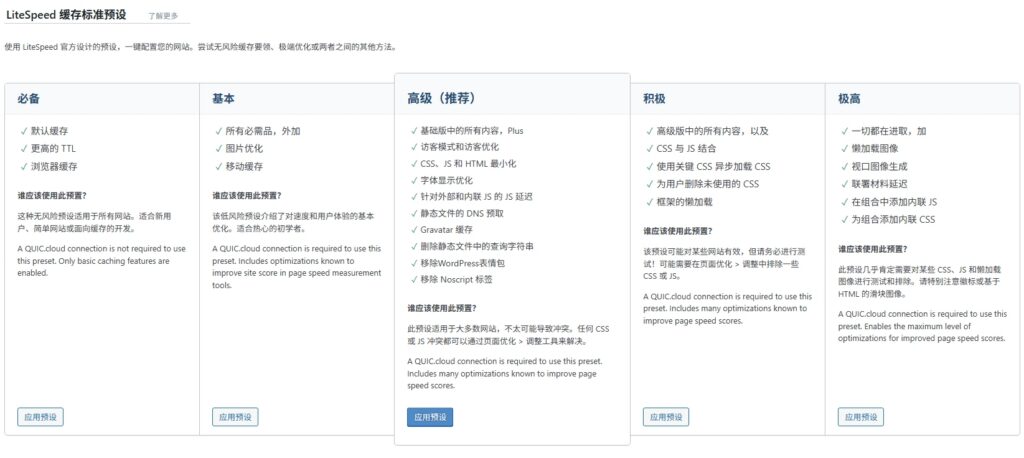
2.安装LiteSpeed Cache插件,这个插件其实功能非常丰富,但是专业性太强,有很多设置都会影响网站的显示,所以不建议手动配置,而是直接用预设配置即可。推荐使用“高级”配置
Presets | Screen-by-Screen | LSCache for WordPress | LiteSpeed Documentation
Screen-by-Screen explanation of the features in LiteSpeed Cache for WordPress plugin Presets section.
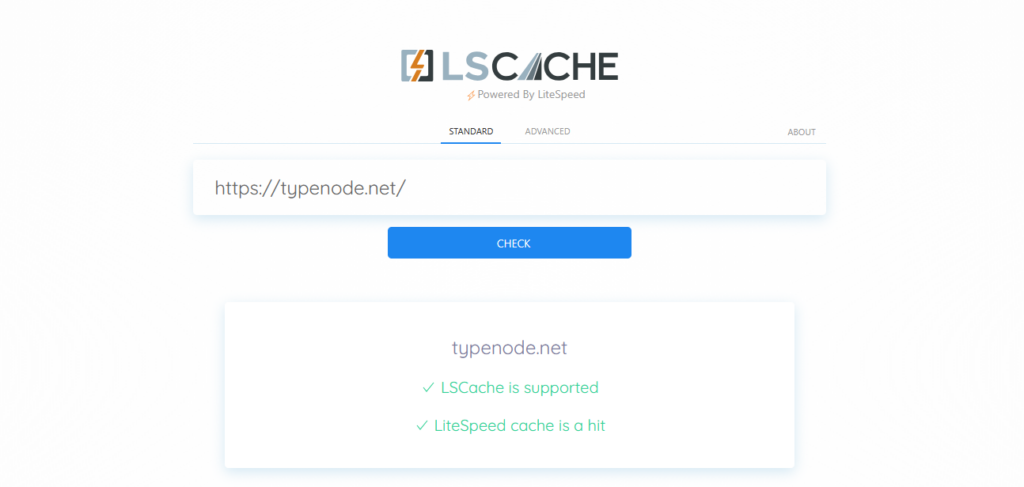
测试是否激活缓存
LSCache Check
Does my site's cache work? Verify LSCache service on any URL.

上面这个网站就可以测试是否激活了LSCache:
发表评论